Button 120x90


Sound
Help For Internet Phone
|
|
Button 120x90 |
|
|
|
||
|
|
||
|
Sound
Help For Internet Phone
|
|
||||
|
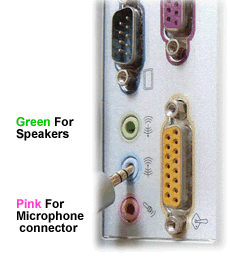
Step 1. Installing Your Sound Hardware Usually on the rear of your pc you will find three, sometimes four, mini din connectors. A example picture of these is displayed on the right. Your are interested in only two of these the Green Receptor and the Pink/Red Receptor Many Computer also have these connectors fitted to the front of the machine. If you are using a headset then you may want to use the front connections. Plug the Green connector from your speakers or headset into the Green receptor. Plug the Pink/Red connector from your microphone into the Pink/Red receptor on. |
|
|||
 |
||||